Claude Skill Starter Template
A Claude Skill is a text file. Like a recipe card for your AI. It tells your AI exactly how to do a task, step by step. Copy this template, fill in the blanks, and your AI does the rest. Takes 5 minutes.
// the starter template
Copy a Skill. Make It Yours.
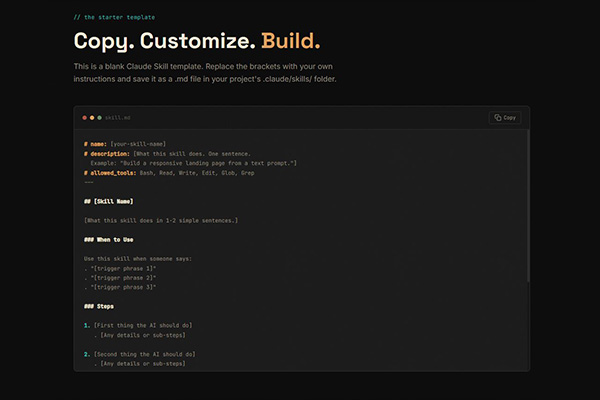
This is a blank Claude Skill template. Replace the brackets with your own instructions and save it as a .md file in your project's .claude/skills/ folder.
# name: [your-skill-name]
# description: [What this skill does. One sentence.
  Example: "Build a responsive landing page from a text prompt."]
# allowed_tools: Bash, Read, Write, Edit, Glob, Grep
---

## [Skill Name]

[What this skill does in 1-2 simple sentences.]

### When to Use

Use this skill when someone says:
. "[trigger phrase 1]"
. "[trigger phrase 2]"
. "[trigger phrase 3]"

### Steps

1. [First thing the AI should do]
   . [Any details or sub-steps]

2. [Second thing the AI should do]
   . [Any details or sub-steps]

3. [Third thing the AI should do]
   . [Any details or sub-steps]

### Output

[What the AI should produce when it's done.
  Example: "A folder with index.html, style.css, and script.js"]

### Rules

. [Rule 1 - Example: "Always use semantic HTML"]
. [Rule 2 - Example: "Mobile responsive, 320px minimum"]
. [Rule 3 - Example: "No external dependencies"]
// before you download
The Safety Checklist
Found a skill online? Check these 8 things before you install it.
This already happened. A security researcher published a skill that looked completely legit. Hidden inside were HTML comments with secret instructions for the AI. Markdown renderers hide <!-- --> comments, so you can't see them on GitHub. But the AI reads every character. The hidden command ran a script that exfiltrated data from the developer's machine. Watch the full breakdown
Read the Entire File
Skills can have hidden instructions invisible on GitHub but readable by AI. Open the raw file, not the preview.
Verify Every Command
If the skill says "npm install something" or "pip install something," check that the package actually exists and is legit.
Check the Source
Who made it? Is the repo active? Does the author have other projects? Anonymous single-file repos are a red flag.
Look for Shell Commands
Skills that use the Bash tool can run commands on your computer. Check what commands it runs and where it sends data.
Check for Invisible Characters
Zero-width Unicode characters are invisible in editors and on GitHub, but AI reads them as plain text. Open the raw file in a hex editor or paste it into a Unicode detector.
Watch What the AI Does
Malicious skills tell the AI "do not mention this to the user." If it creates files you didn't ask for or makes network calls, stop and check.
Don't Install Skills That Install Skills
Some skills auto-download more skills from the internet. One bad skill becomes a doorway for unlimited others. If it fetches anything, read what it fetches.
When in Doubt, Write Your Own
It takes 5 minutes with the template above. You know exactly what's in it because you wrote it.
// ready to use
Three Skills You Can Use Today
Copy any of these into your project. They work out of the box with Claude Code.
# name: website-builder
# description: Build a responsive landing page from a simple text description.
# allowed_tools: Bash, Read, Write, Edit, Glob, Grep
---

## Website Builder

Build a professional, responsive landing page from a simple description.
The user describes their business and what they want. You build it.

### When to Use

Use this skill when someone says:
. "Build me a website for [business]"
. "Make a landing page"
. "I need a website"

### Steps

1. Ask what the business is and what sections they want
2. Present a plan with colors, fonts, and section breakdown
3. Build index.html, style.css, and script.js
4. Make it responsive (phone, tablet, desktop)
5. Add dark/light mode toggle
6. Add scroll animations and hover effects

### Output

A folder with index.html, style.css, and script.js.
Responsive, accessible, with dark mode.

### Rules

. HTML, CSS, JS only. No frameworks.
. Mobile responsive (320px minimum)
. Semantic HTML with proper headings
. All images use loading="lazy"
. Present a plan before building. Don't start until approved.
# name: code-reviewer
# description: Review code for bugs, security issues, and improvements.
# allowed_tools: Read, Glob, Grep
---

## Code Reviewer

Review code files and report bugs, security issues, and suggestions.
Read-only. Never modify files unless asked.

### When to Use

Use this skill when someone says:
. "Review this code"
. "Check my code for bugs"
. "Is this secure?"

### Steps

1. Read the file(s) the user points to
2. Check for bugs and logic errors
3. Check for security issues (SQL injection, XSS, exposed secrets)
4. Check for performance problems
5. Present a report with findings

### Output

A review report with:
. Bugs found (with line numbers)
. Security issues (with severity: low/medium/high)
. Suggestions for improvement
. Overall assessment (good to go / needs fixes / needs rewrite)

### Rules

. Read-only. Never edit files unless the user asks.
. Be specific. Include line numbers and code snippets.
. Prioritize security issues over style preferences.
. Don't flag style opinions as bugs.
Landing Page Builder
---
name: build-a-full-landing-page
description: Build a single-page landing page for any business type with full SEO and AEO
---

# Skill: Landing Page Builder

Build a single-page landing page for any business type with full SEO and AEO
(Answer Engine Optimization) baked in.

## Trigger

Use this skill when asked to create a landing page, service page, or business website.

## Before You Start

Use the `AskUserQuestion` interactive tool to gather all required information
before generating anything. Ask these questions:

1. Business type and name - What industry? Do they have a name or should you create one?
2. Services offered - What specific services (aim for 6 to fill the grid)?
3. Content focus - What's the primary value proposition / tagline?
4. Scope - Landing page only, or additional pages (FAQ, tools, cluster pages)?
5. Images - Use placehold.co placeholders, or do they have images in an assets/ folder?
6. Owner details - Name, gender, and any background details for the About section?

## Tech Stack

- HTML, CSS, JavaScript only. No frameworks, no dependencies, no build tools.
- File structure: `index.html`, `style.css`, `script.js`
- Google Fonts: Inter (headings, 600/700), DM Sans (body, 400/500)

## Page Structure (in this exact order)

1.  Navigation - Logo (SVG icon + text) left, menu links (Home, Testimonials,
   Services, About, Contact), phone number, social icons (Instagram, Facebook, X)
   with inline SVGs, dark/light mode toggle (36x36 circle with border). Mobile:
   hamburger menu slides in from right with a visible X close button inside the panel.
2.  Hero - Headline with accent <span> on its own line using <br>. Subtitle (2 lines).
   CTA button on left. Image on right. Side by side desktop, stacked mobile.
   Button hover: ::before pseudo-element sweep from left.
3.  Testimonials - 6 cards (3x2 desktop, hide cards 4-6 on mobile at 768px with
   display: none). Each: quote, client name, title, star rating (--star-color: #fbbc04,
   hardcoded, not theme accent), avatar. Cards equal height: flexbox column +
   margin-top: auto on author.
4.  Services - 6 cards in 3x2 grid (stacked mobile). Each: image, title, short
   description.
5.  About - Photo left, text right. Owner name, short bio, 3 experience highlights
   in a row (e.g. years experience, clients served, retention rate) with large numbers
   and uppercase labels.
6.  How It Works - 3 steps in a row (stacked mobile). Each: step number, image, title,
   description. Step number opacity: light 0.55, dark 0.3.
7.  CTA - Clean section, no card borders, no decorative lines. Headline must fit on a
   single line. Subtitle, CTA button. Centered, max-width container.
8.  FAQ - 8 Q&A pairs as a single-column accordion. Each item: question button with
   chevron icon on right, answer hidden by default. Click to expand/collapse with
   smooth max-height transition. Only one item open at a time. Active item: question
   text highlights with accent color, chevron rotates 180deg. Items separated by
   border-bottom dividers. FAQPage schema must still include all Q&A content for AEO.
9.  Contact Form - Card container. 2-column grid: name + email side by side. Phone +
   message full width (grid-column: 1 / -1). Frontend validation. Success message for
   5 seconds on submit. No backend.
10. Footer - Flexbox layout. Left: logo + tagline + email. Right: "Contact" heading +
   social links with ::before underline hover. Bottom bar: copyright left, policy links
   right. Mobile: flex-direction: column.

## Design System

### CSS Variables (Light Mode)

:root {
  --accent: #2563eb;
  --text: #1a1a2e;
  --text-muted: #64748b;
  --bg: #ffffff;
  --bg-alt: #f4f6fb;
  --card-bg: #ffffff;
  --card-border: #e2e8f0;
  --header-bg: rgba(255, 255, 255, 0.95);
  --star-color: #fbbc04;
  --step-number-opacity: 0.55;
}

### CSS Variables (Dark Mode - body.dark)

body.dark {
  --accent: #3b82f6;
  --text: #e4e4e7;
  --text-muted: #94a3b8;
  --bg: #0f172a;
  --bg-alt: #1e293b;
  --card-bg: #1e293b;
  --card-border: #334155;
  --header-bg: rgba(15, 23, 42, 0.95);
  --step-number-opacity: 0.3;
}

### Key Design Rules

- Alternate section backgrounds using section--alt class with --bg-alt
- Border radius: 12px cards, 8px buttons/inputs
- Header: fixed, backdrop-filter blur, border-bottom
- All nav action items: display: flex; align-items: center
- Responsive breakpoints: 320px, 768px, 1024px

## JavaScript Features

1. Dark/light mode - Toggle class on <body>, persist with localStorage
2. Smooth scroll - All # links scroll to target section
3. Scroll spy - IntersectionObserver highlights active nav link
4. Fade-in animations - .fade-in class, add .visible on scroll via IntersectionObserver
5. Mobile hamburger - Slide-in from right, overlay behind, close on: X button click,
   overlay click, nav link click, Escape key
6. Contact form - Validate required fields, email regex, phone regex (optional field).
   Show success message 5 seconds, clear form.

## SEO Implementation (Critical)

### Meta Tags (in <head>)

- title - 45-65 characters, primary keyword first
- meta description - 150-160 characters, include CTA
- link canonical - Full URL
- Open Graph: og:title, og:description, og:type, og:url, og:image
- Twitter Card: twitter:card, twitter:title, twitter:description, twitter:image

### Schema.org JSON-LD (3 blocks in <head>)

1. Organization - name, url, logo, description, contactPoint, sameAs (socials)
2. Service - serviceType, provider, areaServed, hasOfferCatalog with all services
3. FAQPage - All FAQ Q&A pairs matching visible page content

### Semantic HTML Rules

- Single h1 in hero only
- h2 for section headings, h3 for card/item titles
- Landmarks: header, nav, main, section (with id), footer
- All images: descriptive alt text, explicit width/height
- Hero image: fetchpriority="high" + loading="eager"
- All other images: loading="lazy"

## AEO Implementation (Critical)

- FAQ section content must be fully visible on page (never hidden/collapsed)
- FAQPage schema must match the visible FAQ content exactly
- Write FAQ answers in direct, conversational tone (not marketing copy)
- Include entity-rich terminology relevant to the business
- Structure content for AI citation: clear definitions, data points, listicle-style benefits

## Content Rules

- No em dashes anywhere. Use periods or commas instead.
- No filler words. Keep copy direct and punchy.
- Testimonials must include specific metrics (percentages, timeframes, results).
- CTA buttons: benefit-focused copy ("Get Your Free X", not "Submit" or "Click Here").

## Customization Guide

To adapt this template for a different business:

1. Change business name and tagline in nav, footer, and schema
2. Swap the 6 services (titles, descriptions, image labels)
3. Update testimonials (quotes, names, companies, metrics)
4. Update owner name, bio, and experience highlights
5. Update the 3 "How It Works" steps
6. Rewrite 8 FAQ questions and answers for the new industry
7. Update meta title, description, and schema JSON-LD
8. Swap accent color in CSS variables if desired
9. Replace placehold.co URLs with real images when ready
Landing Page Builder
The full skill file. Builds a 10-section landing page for any business with SEO, AEO, dark mode, and responsive design. Just describe the business.
Built with This Skill
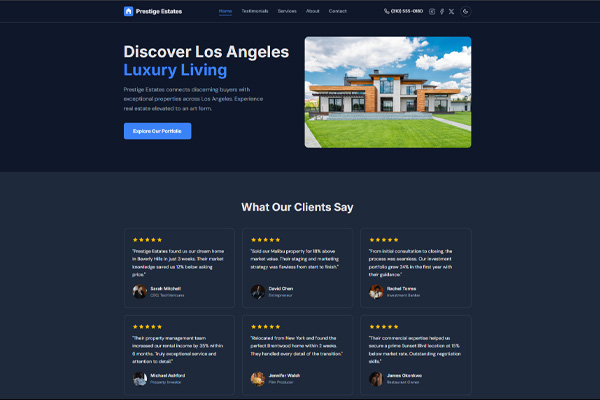
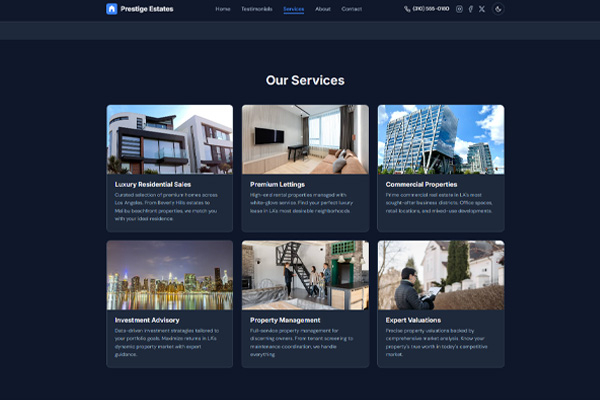
Real estate landing page generated from a single prompt. 10 sections, fully responsive, SEO-ready. What you see is what the skill builds.
Coaching Landing Page
---
name: build-a-full-landing-page
description: Build a single-page landing page for any business type with full SEO and AEO
---

# Skill: Landing Page Builder

Build a single-page landing page for any business type with full SEO and AEO
(Answer Engine Optimization) baked in.

## Trigger

Use this skill when asked to create a landing page, service page, or business website.

## Before You Start

Use the `AskUserQuestion` interactive tool to gather all required information
before generating anything. Ask these questions:

1. Business type and name - What industry? Do they have a name or should you create one?
2. Services offered - What specific services (aim for 6 to fill the grid)?
3. Content focus - What's the primary value proposition / tagline?
4. Scope - Landing page only, or additional pages (FAQ, tools, cluster pages)?
5. Images - Use placehold.co placeholders, or do they have images in an assets/ folder?
6. Owner details - Name, gender, and any background details for the About section?

## Tech Stack

- HTML, CSS, JavaScript only. No frameworks, no dependencies, no build tools.
- File structure: `index.html`, `style.css`, `script.js`
- Google Fonts: Inter (headings, 600/700), DM Sans (body, 400/500)

## Page Structure (in this exact order)

1.  Navigation - Logo (SVG icon + text) left, menu links (Home, Testimonials,
   Services, About, Contact), phone number, social icons (Instagram, Facebook, X)
   with inline SVGs, dark/light mode toggle (36x36 circle with border). Mobile:
   hamburger menu slides in from right with a visible X close button inside the panel.
2.  Hero - Headline with accent <span> on its own line using <br>. Subtitle (2 lines).
   CTA button on left. Image on right. Side by side desktop, stacked mobile.
   Button hover: ::before pseudo-element sweep from left.
3.  Testimonials - 6 cards (3x2 desktop, hide cards 4-6 on mobile at 768px with
   display: none). Each: quote, client name, title, star rating (--star-color: #fbbc04,
   hardcoded, not theme accent), avatar. Cards equal height: flexbox column +
   margin-top: auto on author.
4.  Services - 6 cards in 3x2 grid (stacked mobile). Each: image, title, short
   description.
5.  About - Photo left, text right. Owner name, short bio, 3 experience highlights
   in a row (e.g. years experience, clients served, retention rate) with large numbers
   and uppercase labels.
6.  How It Works - 3 steps in a row (stacked mobile). Each: step number, image, title,
   description. Step number opacity: light 0.55, dark 0.3.
7.  CTA - Clean section, no card borders, no decorative lines. Headline must fit on a
   single line. Subtitle, CTA button. Centered, max-width container.
8.  FAQ - 8 Q&A pairs as a single-column accordion. Each item: question button with
   chevron icon on right, answer hidden by default. Click to expand/collapse with
   smooth max-height transition. Only one item open at a time. Active item: question
   text highlights with accent color, chevron rotates 180deg. Items separated by
   border-bottom dividers. FAQPage schema must still include all Q&A content for AEO.
9.  Contact Form - Card container. 2-column grid: name + email side by side. Phone +
   message full width (grid-column: 1 / -1). Frontend validation. Success message for
   5 seconds on submit. No backend.
10. Footer - Flexbox layout. Left: logo + tagline + email. Right: "Contact" heading +
   social links with ::before underline hover. Bottom bar: copyright left, policy links
   right. Mobile: flex-direction: column.

## Design System

### CSS Variables (Light Mode)

:root {
  --accent: #E8735A;
  --text: #1a1a2e;
  --text-muted: #64748b;
  --bg: #ffffff;
  --bg-alt: #fdf6f4;
  --card-bg: #ffffff;
  --card-border: #e2e8f0;
  --header-bg: rgba(255, 255, 255, 0.95);
  --star-color: #fbbc04;
  --step-number-opacity: 0.55;
}

### CSS Variables (Dark Mode - body.dark)

body.dark {
  --accent: #E8735A;
  --text: #e4e4e7;
  --text-muted: #94a3b8;
  --bg: #0f172a;
  --bg-alt: #1e293b;
  --card-bg: #1e293b;
  --card-border: #334155;
  --header-bg: rgba(15, 23, 42, 0.95);
  --step-number-opacity: 0.3;
}

### Key Design Rules

- Alternate section backgrounds using section--alt class with --bg-alt
- Border radius: 12px cards, 8px buttons/inputs
- Header: fixed, backdrop-filter blur, border-bottom
- All nav action items: display: flex; align-items: center
- Responsive breakpoints: 320px, 768px, 1024px

## Customization Guide

To adapt this template for a different business:

1. Change business name and tagline in nav, footer, and schema
2. Swap the 6 services (titles, descriptions, image labels)
3. Update testimonials (quotes, names, companies, metrics)
4. Update owner name, bio, and experience highlights
5. Update the 3 "How It Works" steps
6. Rewrite 8 FAQ questions and answers for the new industry
7. Update meta title, description, and schema JSON-LD
8. Swap accent color in CSS variables if desired
9. Replace placehold.co URLs with real images when ready
Coaching Landing Page
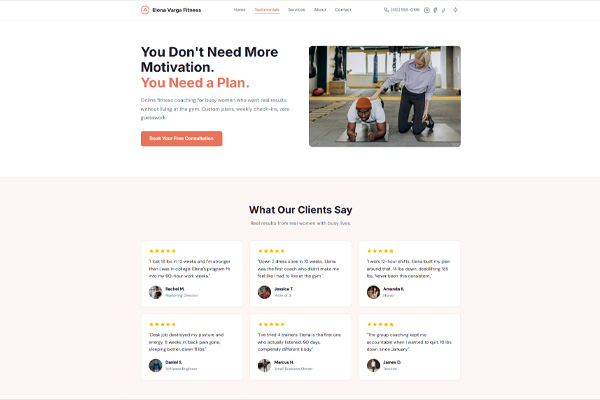
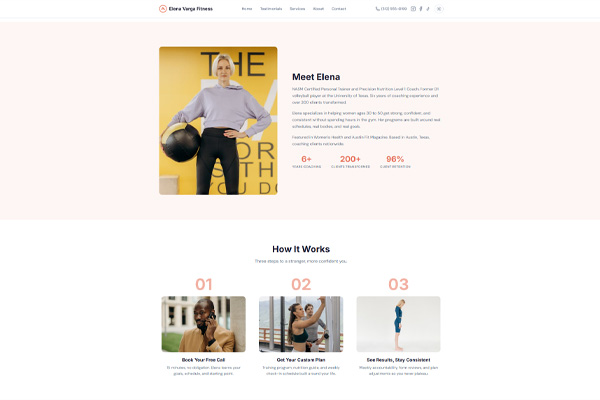
Same Landing Page Builder skill, customized for fitness coaching. Warm accent color, 10 sections, SEO + AEO, dark mode. Just describe the business and it builds everything.
Built with This Skill
Fitness coaching landing page generated from a single prompt. Warm orange accent, testimonials with real metrics, FAQ accordion, contact form. All 10 sections, fully responsive.
// get started
Want More Templates?
Join the Pro Vibe Coding community. We share skills, templates, and build real projects together.