Real Estate Prompt Template
The exact prompt we use to build professional real estate landing pages with AI. Copy it, customize it for your agency, and build.
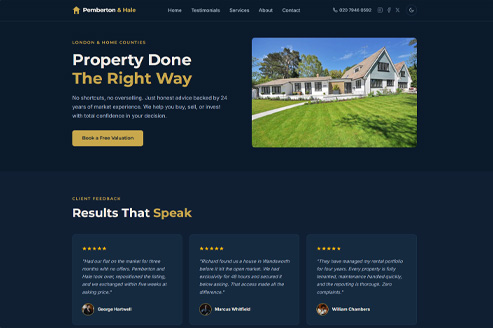
// the full prompt
Copy the Prompt. Build Your Site.
This is the exact prompt to build a real estate landing page. Paste it into Claude Code or any AI tool and let it build.
I want to build a single-page landing page for a local real estate agency.

Tech stack: HTML, CSS, and JavaScript only. No frameworks, no dependencies.

File structure: Single index.html, style.css, and script.js.

Design direction:
- Modern, professional, trustworthy feel
- Google Fonts: clean sans-serif for headings, lighter sans-serif for body
- Come up with a business name and tagline that fits the vibe

Images: I have images in an assets/ folder. Use those, not placeholders.
Filenames: hero.jpg, about.jpg, services-residential.jpg, services-lettings.jpg,
services-valuations.jpg, services-commercial.jpg, services-management.jpg,
services-investment.jpg, how-it-works-1.jpg, how-it-works-2.jpg,
how-it-works-3.jpg, testimonial-1.jpg through testimonial-6.jpg

Page sections (in this exact order):
Navigation, Hero, Testimonials, Services, About, How It Works, CTA, Contact, Footer. Keep this order.

Now here's what each section needs:

1. Navigation
    Logo on left, menu links (Home, Testimonials, Services, About, Contact),
    phone number, social icons (Instagram, Facebook, X) with inline SVGs,
    dark/light mode toggle (36x36 circle with border).
    Every element in the nav actions row needs display: flex; align-items: center.
    Social links need display: flex; align-items: center; justify-content: center.
    Mobile: hamburger menu that slides in from right.

2. Hero Section
    Headline with accent span on its own line using a <br> before the span
    (e.g. Real Estate <span class="text--accent"><br>Done Right</span>).
    Subtitle (2 lines about the agency), CTA button on the left.
    Image on the right. Side by side on desktop, stacked on mobile.
    Button hover: ::before pseudo-element sweep from left. position: relative;
    z-index: 1; overflow: hidden. ::before has width: 0%; left: 0;
    background: #000; z-index: -1; transition: width 0.3s ease.
    On hover: width: 100%; color: #fff; border-color: #000.
    Image: assets/hero.jpg

3. Testimonials
    6 client review cards (3x2 desktop, only show 3 on mobile single column,
    hide cards 4-6 with display: none at 768px).
    Each card: quote, client name, star rating (use Google's star yellow #fbbc04,
    hardcoded as --star-color, not the theme accent), avatar.
    Cards must be equal height per row: use flexbox column + margin-top: auto
    on the author element.

4. Services
    6 service cards in a 3x2 grid (stacked on mobile).
    Services: Residential Sales, Lettings & Rentals, Property Valuations,
    Commercial Leasing, Property Management, Investment Advisory.
    Each card: image, title, short description.
    Images: assets/services-residential.jpg, services-lettings.jpg,
    services-valuations.jpg, services-commercial.jpg,
    services-management.jpg, services-investment.jpg

5. About Section
    Photo on left, text on right. Owner name, short bio,
    years of experience highlight. Image: assets/about.jpg

6. Process Section
    "How It Works", 3 steps in a row (stacked on mobile).
    Each step: number, image, title, description.
    Step numbers should have higher opacity in light mode (0.55)
    vs dark mode (0.3) so they remain visible on both backgrounds.
    Images: assets/how-it-works-1.jpg, how-it-works-2.jpg, how-it-works-3.jpg

7. CTA Section
    Card-style with card background, top and bottom borders.
    Headline, subtitle, CTA button. Centered text.

8. Contact Form
    Wrap the form in a card container with background, border, border-radius.
    2-column grid: name and email side by side. Phone and message fields
    must span full width (grid-column: 1 / -1). Center the section heading.
    On submit: show success message for 5 seconds, clear form.
    No backend, purely frontend.

9. Footer
    Two-column layout. Left: logo (house icon + text), tagline/description
    with a <br> after the tagline sentence, contact email with envelope icon.
    Right: "Contact" header + vertical text links (Instagram, Facebook, X)
    with ::before underline hover. Bottom bar: copyright left,
    Privacy Policy + Cookies Policy right.
    On mobile (768px): stack vertically, bottom bar stacks too.

Requirements:
- Mobile responsive (320px, 768px, 1024px breakpoints)
- Dark/light mode toggle with localStorage persistence
- Smooth scroll for nav links
- Scroll-triggered fade-in animations
- Scroll spy: highlight the active nav link based on which section is in view
- Hover effects on cards and buttons
- CSS variables for theming
- Semantic HTML, accessible
- No em dashes anywhere in the content. Use periods or commas instead
- No filler words. Keep copy direct and punchy
- Alternate section backgrounds (use a secondary bg variable) so sections
  don't blend into each other on dark palettes

Don't build anything yet. Don't explore any files or folders.
Just use exactly what I've told you. Enter plan mode first.
Present the full implementation plan including the business name,
tagline, exact color hex values, font choices, and section-by-section
breakdown. I'll review and approve before you write any code.
// how it works
From Prompt to Live Listing Site
Copy the Prompt
Hit the copy button above. The full prompt is ready to go.
Customize
Swap in your agency name, services, and images. Make it yours.
Paste into AI
Use Claude Code or any AI tool. Let it ask questions, review the plan, then build.
Launch It
You get HTML, CSS, JS. Responsive, dark mode, animations. Ready to go live.
// grab the files
Get the Template & Source Code
TEMPLATE
Prompt Template
The exact prompt we use to build professional real estate landing pages with AI. Tested across 9 builds, refined to perfection.
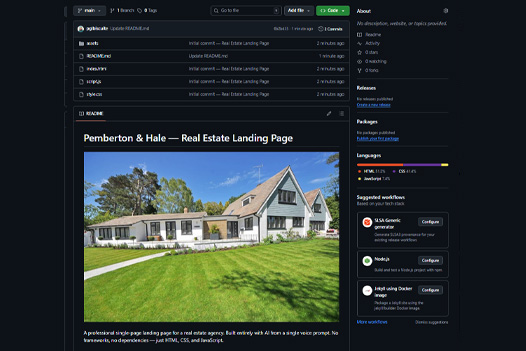 SOURCE CODE
Source Code
Full source code from the build. 9 sections, dark/light mode, responsive, animations. Copy it, customize it, publish it.
// get started
Ready to Build Yours?
Copy the prompt, customize it for your agency, and have a professional landing page in minutes.